Need help? Reach us at 

 +1 (855) 418-2323
Need help? Reach us at
+1 (855) 418-2323

 File Converters TIFF and PDF apps Forensic Freeware
HPGL (Hewlett-Packard Graphics Language) is the standard language for plotters. PLT, HGL, HP, HPL, and PRN files all contain HPGL instructions — pen movements, line coordinates, and pen selections that tell a plotter what to draw. The problem: HPGL files are meant for output devices, not for editing. You cannot open an HPGL file in AutoCAD and modify it as a drawing. To edit plotter data, you need it in DXF — the universal CAD exchange format that every CAD application reads and writes. Total CAD Converter converts HPGL and PLT files to editable DXF in batch, with no AutoCAD required.
(includes 30 day FREE trial)
(only $99.00)
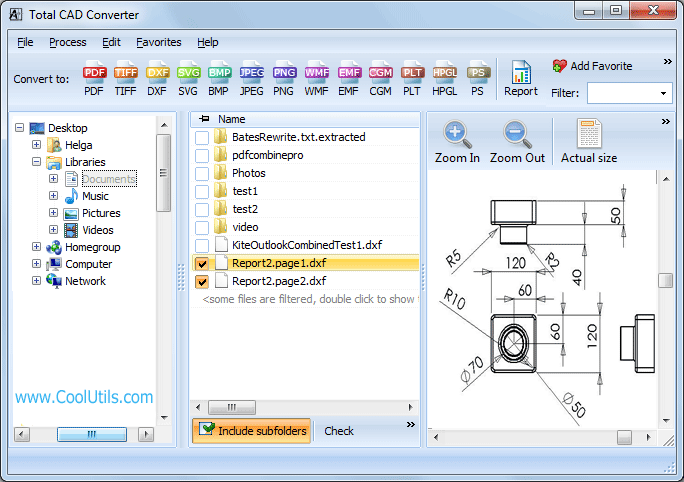
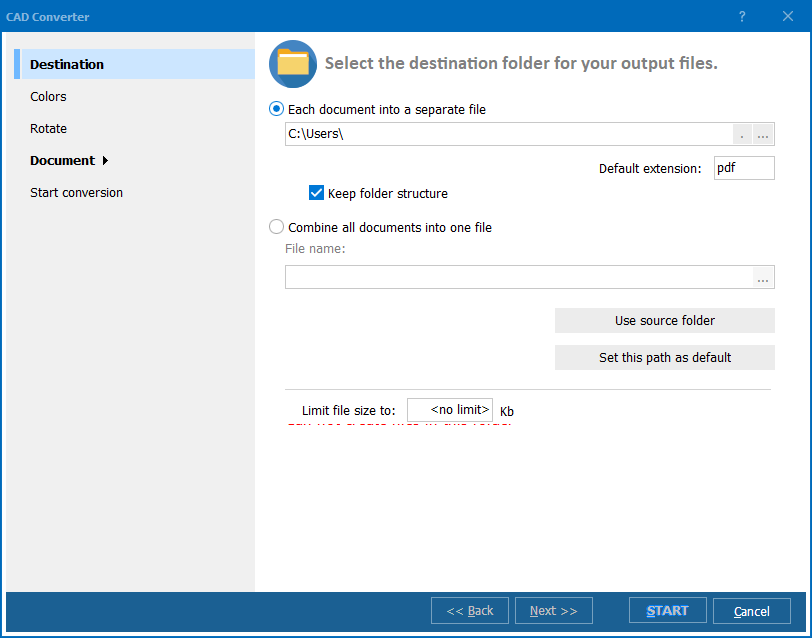
Quick answer: To convert HPGL to DXF, install Total CAD Converter, open the folder with your HPGL or PLT files, check the files or click Check All, click DXF in the format bar, pick a destination folder, then click Start. Each plotter file is rebuilt as an editable DXF drawing in one batch, offline, with no AutoCAD required and no file-size limit.
HPGL (HP-GL / HP-GL/2) is a plotter control language developed by Hewlett-Packard. An HPGL file contains pen-movement instructions: pen up, pen down, move to coordinates, select pen, set line speed. Plotters and wide-format printers read these instructions directly to produce output on paper or film. HPGL is a device language — it describes physical actions, not a design. Files with extensions .plt, .hgl, .hp, .hpl, .spl, and .prn typically contain HPGL data.
DXF (Drawing Exchange Format) is an open CAD interchange format created by Autodesk. A DXF file stores geometric entities — lines, arcs, circles, polylines, text, dimensions — as a structured document that any CAD application can read and edit. DXF is designed for human and machine consumption: you can open it in AutoCAD, LibreCAD, FreeCAD, DraftSight, or dozens of other tools, modify the drawing, and save it back.
| HPGL / PLT | DXF | |
|---|---|---|
| Purpose | Plotter output (device instructions) | CAD interchange (design data) |
| Editability | Not editable as a drawing | Fully editable in any CAD tool |
| Content | Pen movements, coordinates, pen selections | Lines, arcs, polylines, text, dimensions |
| Software | Plotters, specialized viewers | AutoCAD, LibreCAD, FreeCAD, DraftSight, etc. |
| Extensions | .plt, .hgl, .hp, .hpl, .spl, .prn | .dxf |
| Use case | Sending drawings to plotters | Editing, sharing, archiving drawings |
Converting HPGL to DXF reverses the output process: it takes plotter instructions and reconstructs them as editable CAD geometry. This is essential when the original CAD file has been lost and only the plotter file remains.
For a folder with hundreds of PLT files, the batch runs in minutes. No user interaction after clicking Start.
Total CAD Converter includes a command-line interface for scripted and scheduled workflows:
CADConverter.exe C:\PlotFiles\*.plt C:\Output\ -cDXF
This converts every PLT file in the source folder to DXF. Other HPGL extensions work the same way:
CADConverter.exe C:\PlotFiles\*.hgl C:\Output\ -cDXF
CADConverter.exe C:\PlotFiles\*.hp C:\Output\ -cDXF
Save the command in a .bat file and run it via Windows Task Scheduler for automated conversion of incoming plotter files.
Total CAD Converter handles HPGL as input and converts it to DXF, PDF, TIFF, JPEG, BMP, PNG, WMF, SVG, CGM, and other formats. It also reads DWG, DXF, SVG, CGM, and WMF files as input. One tool covers all your CAD conversion needs.
| Feature | Online Converters | Total CAD Converter |
|---|---|---|
| Batch processing | One file at a time | Unlimited files per batch |
| File privacy | Files uploaded to third-party server | Files stay on your machine |
| HPGL variants | Limited (.plt only) | PLT, HGL, HP, HPL, SPL, PRN |
| Output quality | Varies, sometimes rasterized | Vector-to-vector, editable DXF |
| Command line | Not available | Full command-line interface |
| File size limit | Typically 5–50 MB | No limit |
| Requires internet | Yes | No — 100% offline |
| Price | Free or subscription | One-time $99.00 |
Viewing HPGL files traditionally required tools like CorelDRAW ($449+), TurboCAD ($130+), or ACD Canvas ($599+). Total CAD Converter reads HPGL directly at a fraction of the cost — $99 for a perpetual license.
Total CAD Converter handles HP-GL and HP-GL/2 data in all common container extensions: PLT, HGL, HP, HPL, SPL, and PRN. You do not need to know which variant your file uses — the converter detects it automatically.
Select a folder, click Start, and the converter processes every file without user interaction. For recurring tasks, the command line with a scheduled .bat file handles everything automatically.
The conversion reconstructs HPGL pen movements as DXF entities: lines, arcs, polylines. The output is a real CAD drawing, not a rasterized image. You can edit individual elements in any CAD application.
Personal license: $99.00. Free 30-day trial with no restrictions — no email or credit card required.
Windows 7/8/10/11
*.plt for automated batches.CADConverter.exe C:\PlotFiles\*.plt C:\Output\ -cDXF. Save the command in a .bat file and schedule it with Windows Task Scheduler for automated conversion of incoming plotter files.
Download free trial and convert your files in minutes.
No credit card or email required.

Related Topics
Convert CGM to DXF — Batch CGM to DXF Converter for Windows