Logo
Home Products Support Contact About Us
arrow1 File Converters
arrow1 TIFF and PDF apps
arrow1 Forensic
arrow1 Freeware

Convert Email to Text — Save EML and MSG Emails as Plain Text Files


Your inbox holds years of correspondence locked inside EML and MSG files. Extracting that content manually — opening each email, copying the text, pasting it into Notepad — stops being practical after the first dozen messages. Total Mail Converter reads both EML and MSG files directly and saves each email as a clean plain-text file you can search, archive, and process on any system.
  • Converts EML and MSG emails to TXT individually or in batch — thousands at once
  • Lets you pick which fields appear in the output: sender, date, subject, body, CC, BCC
  • Merges all messages into one text file or saves each as a separate .txt
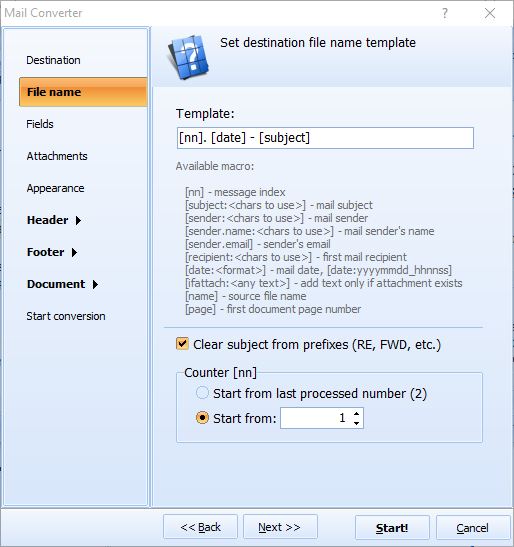
  • Names output files by date, sender, or subject using customizable templates
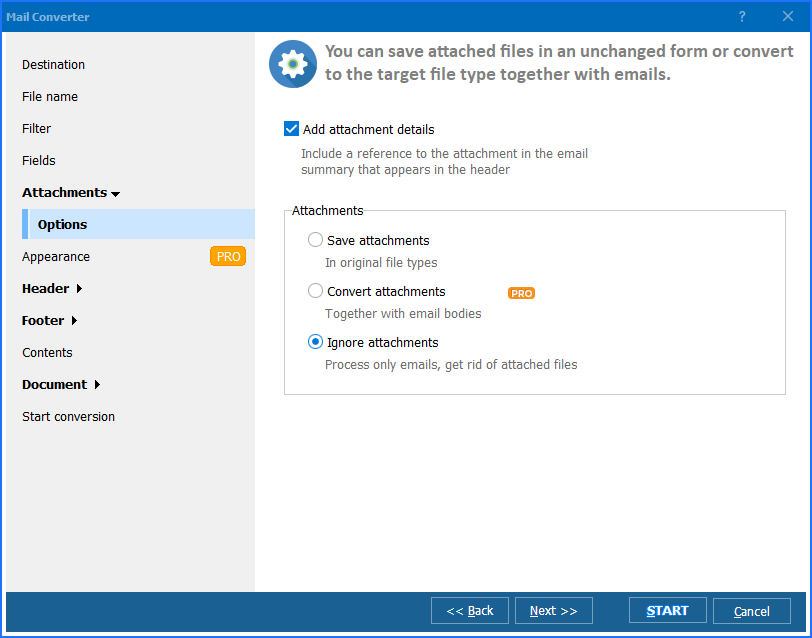
  • Saves attachments separately — not embedded in the text output
  • Runs from the GUI or the command line for scripted workflows

Download Total Mail Converter and convert your emails to plain text today.


Download Now!

(includes 30 day FREE trial)

Buy License

(only $59.90)

Email Formats vs Plain Text: What Is the Difference?

EML is the RFC 5322 email format used by Thunderbird, Windows Mail, and most non-Microsoft clients. Each .eml file packages MIME headers, an HTML or plain-text body, and Base64-encoded attachments into one file. Open it in a text editor and you see encoded binary blocks, MIME boundaries, and HTML tags mixed with the actual message.

MSG is Outlook's native format. Each .msg file is an OLE Compound Document — a binary container holding the sender, recipients, subject, date, message body in RTF or HTML, embedded images, file attachments, and Outlook-specific properties. Opening an MSG file requires Outlook or a compatible MAPI client.

TXT is the simplest document format. A .txt file holds only characters and line breaks — no markup, no encoding, no binary data. It opens instantly in Notepad, VS Code, or any editor on Windows, macOS, and Linux. Text files are the default input for search indexers, databases, and data-analysis scripts.

Converting emails to text strips MIME encoding, HTML tags, OLE structures, and binary attachments. What remains is clean, readable content: the sender, date, subject, and message body. The output is compact, universally accessible, and easy to search with standard tools.

How to Convert Email to Text

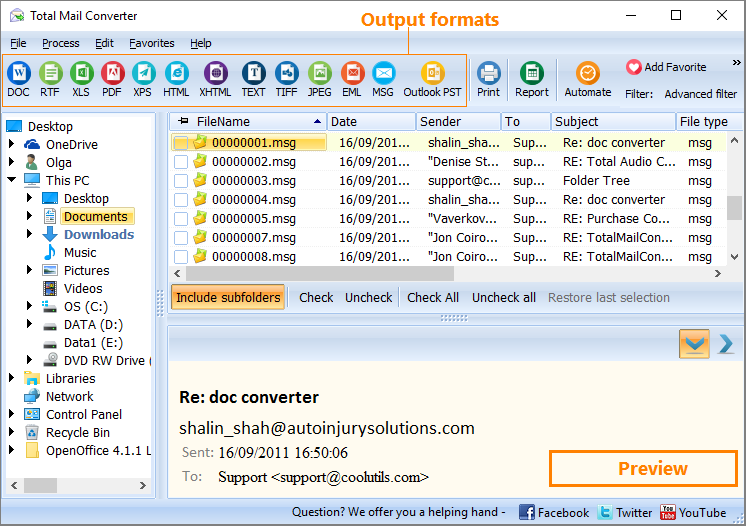
  • Step 1. Launch Total Mail Converter. Click Add files to select individual emails, or click Add folder to load an entire directory of EML or MSG files at once.
  • Step 2. Select the emails you want to convert. Click Check All to process everything, or tick individual messages in the file list.
  • Step 3. Click the TXT button in the format toolbar at the top of the window. The conversion wizard opens.
  • Step 4. Choose a destination folder for the output text files.
  • Step 5. Configure the output: select which email fields to include (sender, date, subject, body, CC, BCC), set the file-naming template (date, sender, subject), and choose whether to save each email separately or merge all into one file.
  • Step 6. Press Start. The converter extracts readable content from each email and saves it to the destination folder as plain text.

Output files contain clean, human-readable text. Attachments are saved separately to the same or a different folder — they are not embedded in the text output.

Command-Line Conversion

Total Mail Converter includes a command-line interface for scripting and automation:

MailConverter.exe "C:\Emails\*.eml" -sTXT "C:\Output\Text\"

For MSG files, the syntax is the same:

MailConverter.exe "C:\Emails\*.msg" -sTXT "C:\Output\Text\"

Specify the source path (wildcards supported), -sTXT for the target format, and the destination folder. Save the command in a .bat file and schedule it with Windows Task Scheduler for unattended nightly exports. The command-line mode accepts all the same options as the GUI — field selection, file naming, merge mode, and attachment handling.

Why Use Total Mail Converter?

Green PlusBoth EML and MSG in one tool. No need for separate converters. Total Mail Converter reads EML, MSG, and MIM files from any mail client — Outlook, Thunderbird, Apple Mail, Windows Live Mail — and converts them all to plain text with the same settings.

Green PlusSelective field export. Choose exactly which email fields appear in the output: sender, recipient, date, subject, body, CC, BCC, or any combination. Exclude unnecessary headers to keep the text clean and focused on the content that matters.

Green PlusMerge or split. Save each email as its own .txt file for individual access, or merge an entire folder into one continuous text document. The merge option is useful for full-text search across thousands of messages.

Green PlusCustomizable file naming. Name output files using date, sender, subject, or a custom template. A pattern like [Date]-[Subject].txt produces filenames that sort chronologically and are easy to locate in file managers.

Green PlusBatch processing. Convert thousands of emails in one session. Point Total Mail Converter at a folder tree and it processes every email it finds — no file-count limit.

Green PlusMultiple output formats. Besides TXT, Total Mail Converter exports emails to PDF, DOC, HTML, TIFF, PST, XLS, and more from the same interface. One license covers every email conversion task.

Online Converters vs Desktop Converter

FeatureOnline ConvertersTotal Mail Converter
Batch exportOne file at a timeEntire folders at once
Field selectionNo controlChoose specific fields
File namingGeneric namesAutomatic templates (date, sender, subject)
Merge optionNot availableBuilt-in merge to one file
File size limit5–25 MB per uploadNo limit
Speed (10,000 emails)Hours of uploadingMinutes
Command-line automationNot possibleFull CLI + .bat scripting
PrivacyFiles uploaded to third-party servers100% offline — files stay on your PC
PricingFree with limitsOne-time $59.90

download email to text converter

Windows 7/8/10/11 • 30-day free trial

When Do You Need Email to Text Conversion?

There are several real-world scenarios where saving emails as plain text is the right approach:
  1. Lightweight archiving. Text files are a fraction of the size of MIME-encoded emails. A folder of EML files with HTML formatting and embedded images shrinks dramatically when saved as plain text, making long-term storage on external drives or NAS more practical.
  2. Full-text search across email archives. Text files can be indexed by Windows Search, Everything, or grep-based tools. Searching across years of correspondence takes milliseconds instead of opening each email file in a client.
  3. Data extraction for text mining. Researchers and analysts export email bodies to text for processing with Python, R, or other data tools. Plain text is the simplest input format for sentiment analysis, keyword extraction, and NLP pipelines.
  4. Cross-platform access without a mail client. Text files open on any device — Windows, macOS, Linux, Android, iOS — without installing Outlook, Thunderbird, or any email client. Share a .txt file and anyone can read it.
  5. Compliance and audit records. Regulated industries often require email records in a non-proprietary format. Plain text with sender, date, and subject fields satisfies most audit requirements without locking data into a vendor-specific ecosystem.


Download Now!

(includes 30 day FREE trial)

Buy License

(only $59.90)


quote

Total Mail Converter Customer Reviews 2026

Rate It
Rated 4.7/5 based on customer reviews
5 Star

"We migrated from Exchange to Google Workspace and had 40,000 MSG files from departed employees. Total Mail Converter turned them into searchable text files in about twenty minutes. The file-naming templates made organizing by date and sender straightforward. Saved us from keeping Outlook licenses just to read old emails."

5 Star Rachel Whitmore IT Administrator

"Our audit process requires email records in a vendor-neutral format. Converting EML and MSG files to plain text with sender, date, and subject fields gives us a clean paper trail that any reviewer can open without specialized software. The command-line interface lets us schedule weekly batch exports automatically."

5 Star David Kowalski Compliance Analyst

"I use Python for text analysis on email archives. Total Mail Converter strips MIME encoding and HTML cleanly, so I get raw message bodies ready for tokenization. The merge option saves me a concatenation step when I need one big corpus file. Would appreciate a Linux version, but the Windows tool does the job well."

4 Star Linda Parsons Freelance Researcher

Email to Text Conversion: FAQ ▼

Total Mail Converter reads EML, MSG, and MIM files. EML is the standard format used by Thunderbird, Windows Mail, and most non-Microsoft clients. MSG is Outlook's native format. Both are converted to clean plain-text TXT files with the same settings and interface.
You choose which fields appear: sender, recipient, date, subject, body, CC, and BCC. Uncheck anything you do not need in the wizard's Fields tab. Only selected fields are written to the output file.
Yes. Enable the merge option in the destination settings. Total Mail Converter combines all selected emails into one .txt file with clear message boundaries between them. This is useful for full-text search across an entire email archive.
Attachments are not embedded in the text output. They are saved as separate files in their original format to the same folder or a subfolder you specify. Documents, images, and archives remain intact and accessible.
Text files are significantly smaller. An EML file with HTML formatting, embedded images, and Base64-encoded attachments may be 500 KB. The plain-text version of the same email body is typically 2–10 KB. Attachments are saved separately and not counted in the text file size.
Yes. Run MailConverter.exe "C:\Emails\*.eml" -sTXT "C:\Output\" to convert all EML files in a folder. The same syntax works for MSG files. Save the command in a .bat file and schedule it with Windows Task Scheduler for unattended exports.
A personal license costs $59.90 — a one-time purchase with no subscription. A 30-day free trial is available with full functionality. No credit card or email address is required to start the trial.


Start working now!

Download free trial and convert your files in minutes.
No credit card or email required.

⬇ Download Free Trial Windows 7/8/10/11 • 87 MB

Support
Total Mail Converter Preview1
Total Mail Converter Preview2
Total Mail Converter Preview3

Latest News

Newsletter Subscribe

No worries, we don't spam.


© 2026. All rights reserved. CoolUtils File Converters

Cards