Need help? Reach us at 

 +1 (855) 418-2323
Need help? Reach us at
+1 (855) 418-2323

 File Converters TIFF and PDF apps Forensic Freeware
Download Total HTML Converter and start extracting plain text from HTML files today.
(includes 30 day FREE trial)
(only $49.90)
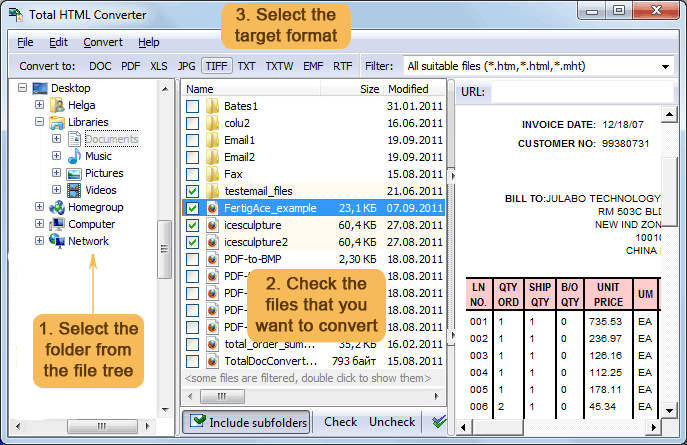
Quick answer: To convert HTML to text, install Total HTML Converter, browse to the folder of HTML files, check the files you want, click the TXT button, set the destination folder and text encoding (ANSI, Unicode, or UTF-8), then press Start. The converter strips every tag, script, and style in one batch — offline, with no upload and no file-size limit.
HTML (HyperText Markup Language) is the standard format for web pages. An HTML file contains the visible text mixed with tags that define headings, paragraphs, links, images, tables, and styles. Browsers interpret these tags and render formatted pages; text editors show raw markup. HTML files may also include embedded CSS stylesheets and JavaScript code that add visual styling and interactivity.
Plain text (TXT) contains only characters — letters, digits, punctuation, and whitespace. No formatting, no tags, no embedded objects. Every text editor, search tool, database import utility, and scripting language reads plain text without any special parser. Text files are small, universally compatible, and easy to process.
The practical difference: HTML carries presentation; plain text carries information. When you need to index content, feed text to a script, import data into a database, or simply read an article without distractions, converting HTML to text removes the markup overhead and gives you exactly the words you need.
| Feature | HTML | Plain Text |
|---|---|---|
| Formatting tags | Yes (headings, bold, links, tables) | None |
| Embedded scripts | JavaScript, CSS | None |
| File size | Larger (markup overhead) | Smallest possible |
| Readability in any editor | Tags clutter the view | Clean, readable immediately |
| Searchability | Tags interfere with search | Exact word matches |
| Database import | Requires parsing | Direct import |
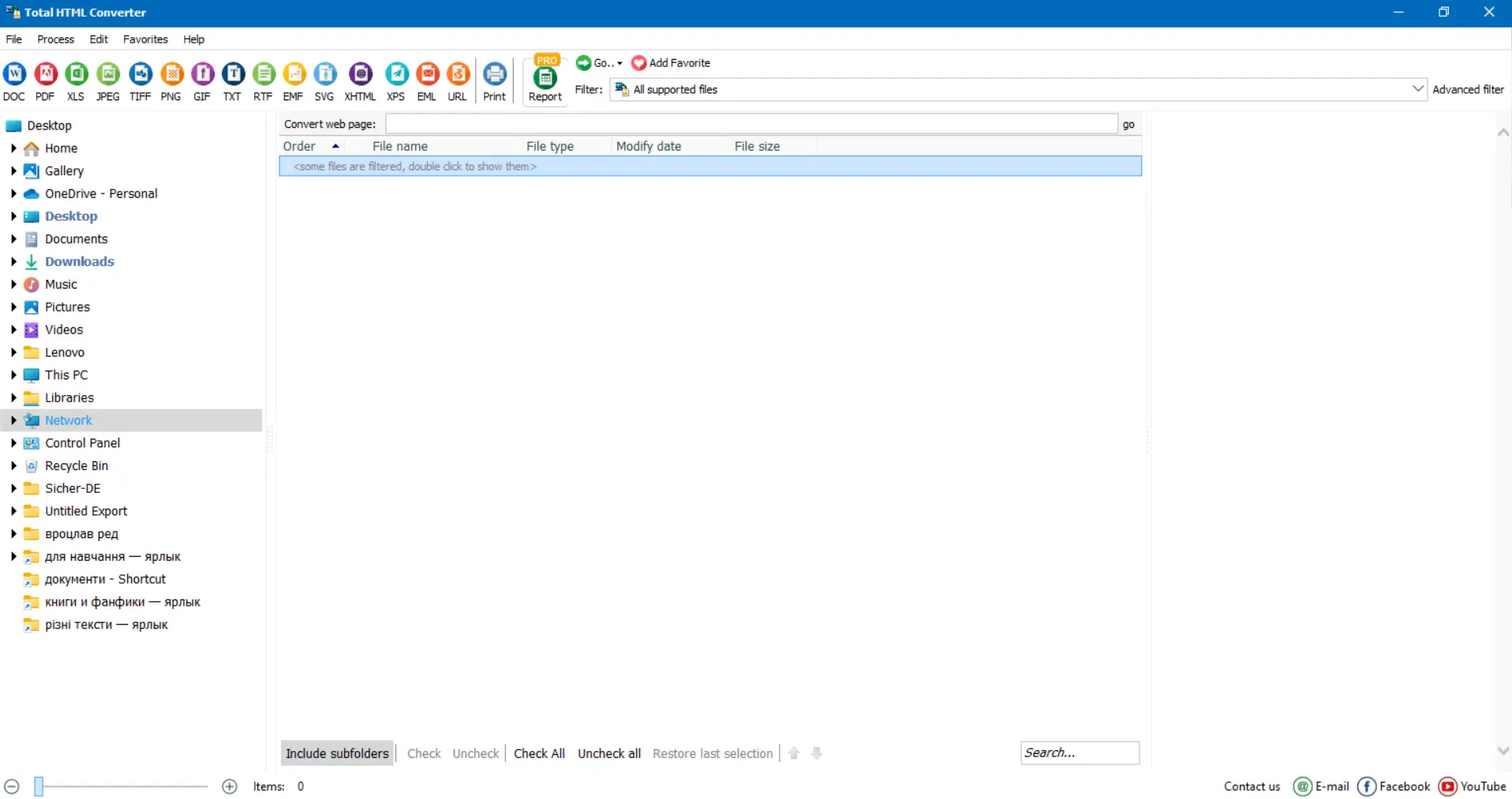
Conversion is fast even for thousands of files. Each output text file keeps the readable content without any HTML markup.
Total HTML Converter includes a command-line interface for scripted and automated workflows. Example:
HTMLConverter.exe C:\Pages\report.html C:\Output\report.txt -cTXT
Process an entire folder of HTML files:
HTMLConverter.exe C:\Pages\*.html C:\Output\ -cTXT -Encoding:UTF8
Add this to a .bat file or a Windows Task Scheduler job to extract text from incoming HTML files automatically — useful for content pipelines, archiving web pages, and feeding data into text-processing tools.
Select hundreds or thousands of HTML, HTM, and MHT files and convert them all to plain text in one run. No manual file-by-file copying. The converter handles large queues without slowing down.
Choose between ANSI, Unicode, and UTF-8 output encoding. If your HTML files contain non-Latin characters — Cyrillic, Chinese, Arabic, accented European letters — UTF-8 output preserves every character correctly.
Some HTML pages generate content with JavaScript. Total HTML Converter can render JavaScript before extracting text, so dynamically generated content is captured. CSS-based formatting is stripped cleanly, leaving only the text.
Saved web pages in MHT format (single-file web archives) are converted just like regular HTML. No need to unpack them first — the converter reads the MHT container and extracts the text directly.
All processing happens on your local machine. Web pages often contain sensitive content: internal reports, customer data, legal documents. None of it leaves your PC during conversion.
Besides TXT, Total HTML Converter supports PDF, DOC, RTF, XLS, TIFF, JPEG, ODT, and more. One tool handles all your HTML conversion needs.
| Feature | Online Tools | Total HTML Converter |
|---|---|---|
| File size limit | 5–50 MB | No limit |
| Batch conversion | One file at a time | Unlimited |
| Privacy | Files uploaded to cloud | 100% offline |
| Encoding options | Limited or none | ANSI, Unicode, UTF-8 |
| JavaScript rendering | Rarely supported | Built-in |
| MHT support | Rarely supported | Full support |
| Automation | Manual or paid API | Built-in command line |
| Pricing | Subscription or ads | One-time $49.90 |

(includes 30 day FREE trial)
(only $49.90)
Download free trial and convert your files in minutes.
No credit card or email required.

Related Topics
Total HTML Converter